


Fishing in Delta Force Season 11 does not unlock from a standard menu. To begin, reach Operations Level 17, enter Layali Grove - Easy, find Joe Reed, complete his fishing request, extract safely, and claim your first fishing equipment through the GTI Mailbox.
If the Fishing tab or fishing rod seems to be missing, the unlock chain is usually incomplete. This guide walks through the full path from Level 17 to your first cast, then explains how to protect your rod in the EDC Tool Kit, where Fishing is available, and how the Float Rod and Lure Rod work.
How to Unlock Fishing in Delta Force Season 11
Follow this order to unlock Fishing:
1. Reach Operations Level 17.
2. Deploy into Layali Grove - Easy.
3. Find Joe Reed, the Fishing-related NPC.
4. Continue speaking with him until the fishing request becomes available.
5. Accept and complete the request objective.
6. Extract from the raid.
7. Return to the main menu and open the GTI Mailbox.
8. Claim the fishing reward.
9. Open Black Site, select Fishing, and put the rod into the EDC Tool Kit.
10. Deploy to an eligible map, find a fishable body of water, select the rod through the EDC Tool Kit wheel, and cast.
Fishing is not unlocked just by reaching Level 17. The Joe Reed request and the mailbox claim are both part of the process.
Caption: The Fishing unlock path begins at Operations Level 17 and ends with your rod safely equipped through the EDC Tool Kit.
What You Need Before You Start
Operations Level 17
Fishing becomes available after you reach Operations Level 17. If Joe Reed does not offer the Fishing-related interaction, check your Operations level before spending multiple raids searching Layali Grove.
Layali Grove - Easy Access
The unlock encounter takes place in Layali Grove - Easy. You do not need to begin by searching Zero Dam or AZ3. Those maps matter after Fishing is unlocked, but Joe Reed is the first step.
A Low-Risk Extraction Plan
Treat the Joe Reed visit as an objective run, not a high-value loot run. Bring a kit you can afford to lose, avoid unnecessary fights, and know where you plan to extract before you begin searching.
The important result is not a full backpack. It is completing the request and leaving the raid safely so the reward can reach your GTI Mailbox.
Where to Find Joe Reed in Layali Grove - Easy
Joe Reed is the NPC connected to the Season 11 Fishing unlock. Check the confirmed Joe Reed locations shown on the Layali Grove map before deploying, especially the water-adjacent areas and new locations around Layali Grove 2.0.
His location may not be identical in every deployment, so do not rely on one old screenshot or a single coordinate. Use the current map markers and compare the possible points before committing to a long search.
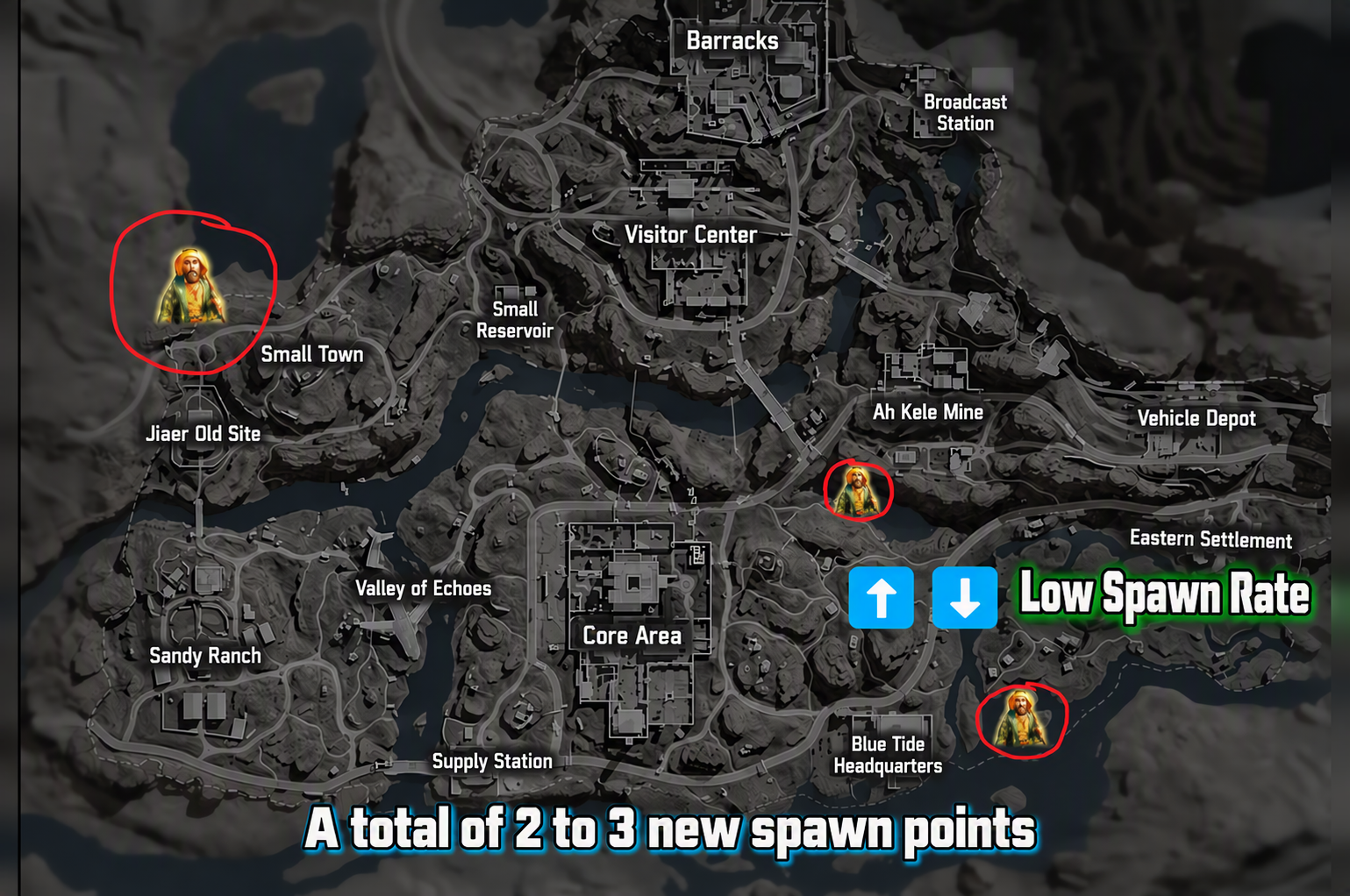
Caption: Check the confirmed Joe Reed locations before deployment instead of searching Layali Grove without a route.
Important Conversation Tip
Do not leave after only one dialogue line. Continue interacting with Joe Reed until the Fishing request appears and make sure the objective is active before moving away.
If the interaction is interrupted by combat or the request does not appear, finish the raid or extract when safe, then try again in a fresh Layali Grove - Easy deployment. Confirming the objective is active is more important than rushing toward loot.
How to Complete Joe Reed’s Fishing Request
After you accept the request, check your active mission list and complete the objective shown in your client. The exact quest text can differ by game language and may change with live updates, so follow the wording in your own mission tracker.
Once the objective is complete:
1. Extract from Layali Grove - Easy.
2. Return to the main menu.
3. Open the GTI Mailbox.
4. Claim the Fishing reward message.
5. Check that the fishing equipment has moved into your available inventory or Fishing storage.
Do not expect the first rod to appear automatically inside your raid backpack. The reward is delivered through the mailbox after the request has been completed and the match result has processed.
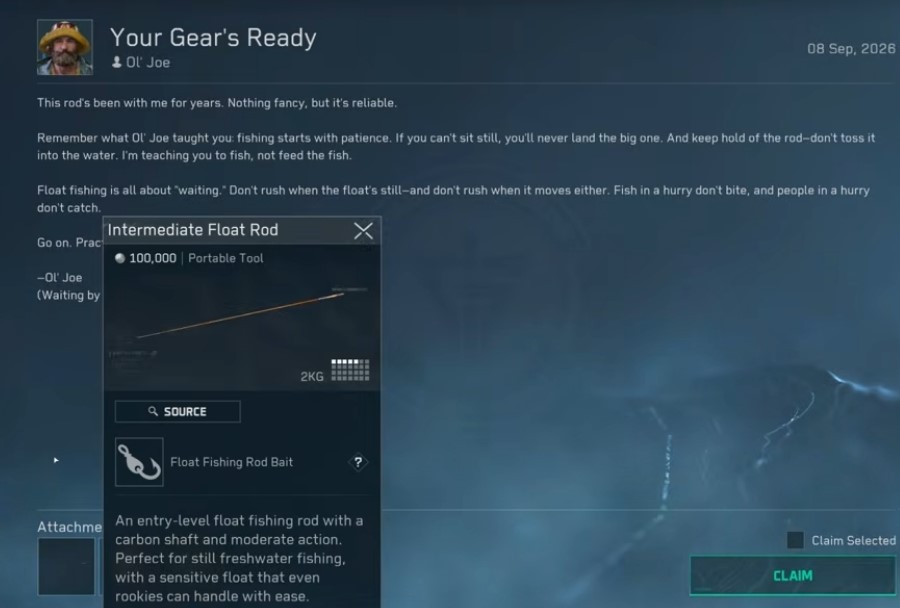
Caption: Complete Joe Reed’s request, extract, then claim the Fishing reward from the GTI Mailbox.
How to Equip Your First Fishing Rod
Claiming the rod is not the final step. You need to place it in the correct protected Fishing storage before taking it into Operations.
Open Black Site, select the Fishing tab, then open the EDC Tool Kit. Place your fishing rod, line, and bait into their Fishing equipment slots. During a raid, open the EDC Tool Kit wheel and select the rod when you reach fishable water.
The EDC Tool Kit matters because it keeps your Fishing equipment in the dedicated Fishing setup instead of treating your first rod like ordinary loose loot. Before deploying, always check that the rod is in the EDC Tool Kit rather than sitting unprotected in your backpack.
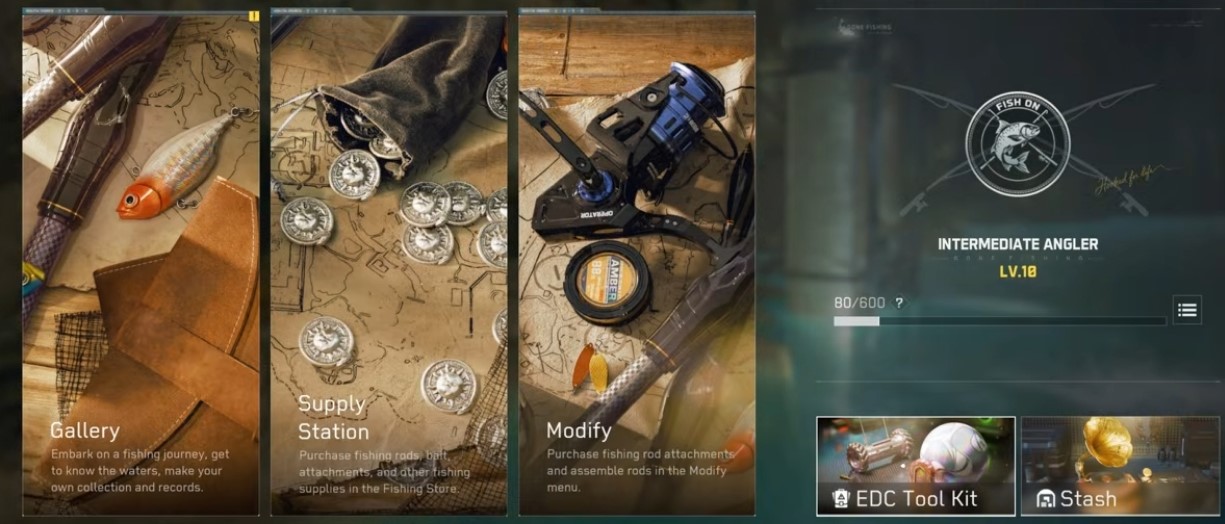
Caption: Claim the rod first, then place it in the EDC Tool Kit before your next Fishing run.
Which Maps Support Fishing?
Fishing is available on selected Operations maps. The Season 11 Fishing system includes the Easy versions of these maps:
Layali Grove - Easy
AZ3 - Easy
Zero Dam - Easy
Map availability can change with the live Operations rotation. Before planning a Fishing run, open the current Operations screen and confirm that the map you want is available.
Layali Grove is the most important map for new players because it is also where the Joe Reed unlock chain begins. After Fishing is unlocked, use the map that best fits your route, risk tolerance, and available extraction options.
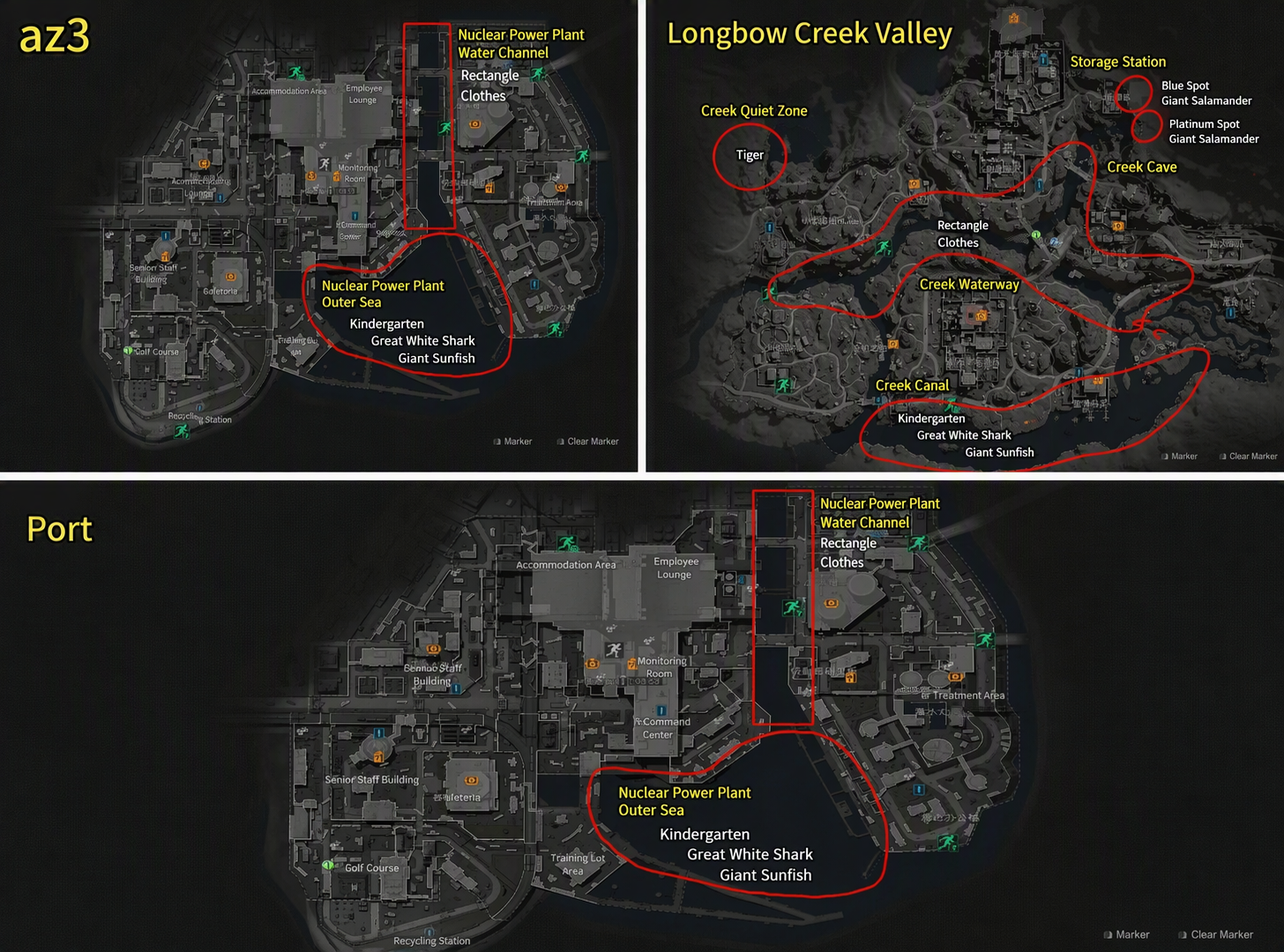
Caption: Check the live Operations rotation before planning a Fishing run on Layali Grove, AZ3, or Zero Dam.
How to Fish With the Float Rod
The Float Rod is the simpler option for your first Fishing sessions.
1. Reach a fishable body of water.
2. Open the EDC Tool Kit wheel.
3. Select the Float Rod.
4. Cast into the water.
5. Watch the float closely.
6. Reel in when the float clearly sinks.
The key is timing. Do not reel in as soon as the float moves slightly. Wait for the full bite signal, then react quickly. Reeling too early can waste time and make catches less consistent.
How to Fish With the Lure Rod
The Lure Rod uses a more active tension mechanic. Instead of waiting only for a float to sink, you need to control the line while the fish struggles.
1. Cast near fishable water.
2. Watch for the line to become taut.
3. Respond to the fish’s movement by reeling in the opposite direction.
4. Monitor the tension indicator.
5. Reduce pressure before tension stays in the red zone.
6. Bring the fish in to finish the catch.
The goal is not to hold the reel button constantly. Keep control of the fight and avoid letting the line stay under maximum tension for too long.
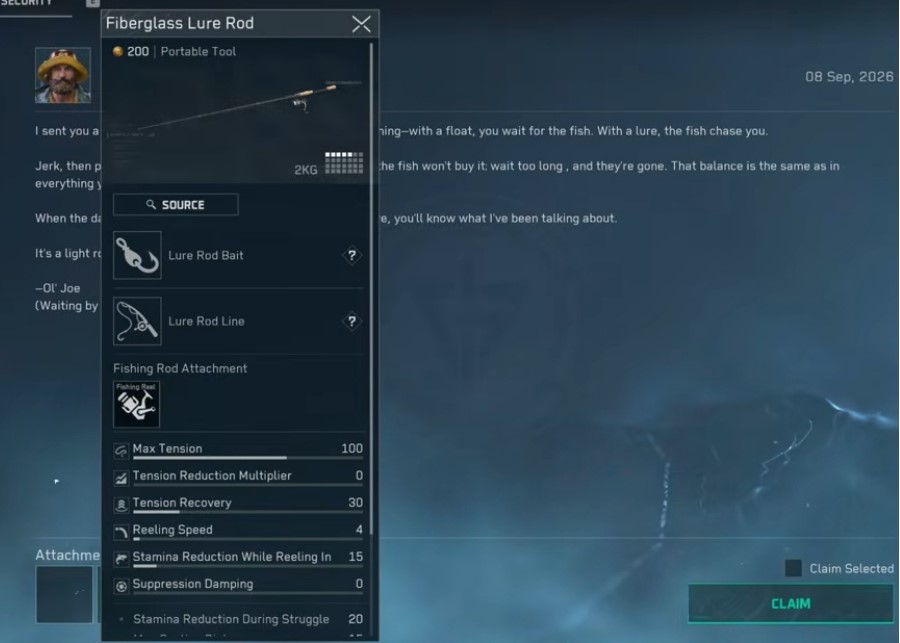
Caption: The Float Rod rewards bite timing, while the Lure Rod requires directional control and tension management.
Fishing Level, Certification and Progression
Every successful catch contributes to Fishing progress. As your Fishing Level increases, return to Joe Reed when the game prompts you to complete the next assessment or certification step.
Fishing Certification is important because higher certifications can open access to more advanced Fishing equipment. Your Fishing Gallery also records catches, including their rarity and other collection details.
Do not rush directly into expensive equipment. First learn the basic minigames, identify safe Fishing spots, and build a repeatable extraction route. A reliable low-risk Fishing run is usually more useful than losing valuable supplies while learning the system.
Fishing Safety Tips for Operations
Fishing leaves you exposed. You are often standing still near open water, focusing on the Fishing UI, and using a predictable shoreline position. Treat every cast like a small objective that needs security.
Clear nearby AI and watch likely player routes before you begin.
Fish from cover or a position with a quick escape route when possible.
Keep your weapon ready before opening the EDC Tool Kit wheel.
Bring only the bait and line you are comfortable risking.
Use a teammate as a lookout in high-traffic areas.
Check the extraction timer before beginning a longer Lure Rod fight.
Confirm your rod is stored in the EDC Tool Kit before deployment.
Do not assume a quiet shoreline is safe. Other squads can approach while you are focused on the water.
Fishing Not Unlocking? Try These Fixes
Joe Reed Has No Fishing Request
Confirm that you are Operations Level 17 or higher and that you are in Layali Grove - Easy. Continue the interaction until the Fishing request appears instead of leaving after the first dialogue line.
Joe Reed Is Not at the Expected Location
Use the current Layali Grove map markers and check the other confirmed locations. If you still cannot find him, extract or finish the run and search again in a fresh deployment.
I Completed the Request but Did Not Receive a Rod
Extract first, return to the main menu, and check the GTI Mailbox. The Fishing reward is delivered through mail, rather than appearing directly in your raid backpack.
I Cannot See the Fishing Tab
Claim the GTI Mailbox reward, then reopen Black Site and check the Fishing section again. Also confirm that your Season 11 game resources are fully downloaded and the previous match has finished processing.
I Lost My Rod After Dying
Before your next run, confirm that the rod is placed in the EDC Tool Kit. Do not rely on a loose backpack slot for equipment that you need to keep available.
AZ3 or Zero Dam Is Unavailable
Fishing maps can follow a live rotation. Check the Operations screen and use the currently available Fishing map instead of assuming the feature is unavailable.
Plan Your Fishing Route Before You Deploy
The safest Fishing run starts before you enter the match. Check the active map rotation, mark the water access point you plan to use, identify nearby player routes, and choose an extraction route before your first cast.
Use the Delta Force Tools Interactive Map to review Layali Grove routes, water-adjacent areas, points of interest, and extraction planning. If you are searching for Joe Reed, use the map to compare confirmed locations before starting another raid.
Related Delta Force Guides
Use the Delta Force Tools Interactive Map to plan Layali Grove routes, locate points of interest, and prepare a safer extraction path.
Read the Delta Force Season 11 guide for the wider Reorientation update, including new content, systems, and first-day priorities.
Browse Delta Force weapon builds if you need a low-risk Operations loadout for a Joe Reed or Fishing objective run.
Keep Your Fishing Plan Current
Fishing locations, map rotation, quest behavior, and available equipment can change with live updates. Check the current Operations screen before deploying, verify the Fishing tab and EDC Tool Kit setup after major patches, and revisit this guide when new Fishing content becomes available.
Join the Delta Force Tools Community
Want help finding Joe Reed, choosing a Fishing route, or learning the Float and Lure Rod minigames? Join the Delta Force Tools Discord community to compare Fishing locations, share route ideas, discuss Season 11 updates, and stay updated on new maps, builds, Gun Codes, and guides.
Join the Delta Force Tools Discord community
Add Delta Force Tools Bot to Your Server
Run a Delta Force clan, squad, or gaming community? Add the Delta Force Tools bot to your Discord server so members can search weapon builds, check available Gun Codes, and discover community loadouts without leaving Discord.
Add Delta Force Tools Bot to your server
The bot is built for Build search and sharing. Join the official community to request features, share feedback, and get updates on new tools and guides.