


Delta Force Gun Codes let players import a complete weapon setup instead of manually rebuilding every attachment. A Gun Code can include a weapon build’s attachments and configuration, making it faster to test community loadouts in Warfare or Hazard Operations.
On Delta Force Tools, every weapon Build page includes a Gun Code that you can copy before opening the game. Use the steps below to import it, apply the build, and check that it matches the mode you want to play.
What Is a Delta Force Gun Code?
A Delta Force Gun Code is an importable Gunsmith string used to apply a weapon setup quickly. Rather than selecting optics, muzzles, grips, magazines, stocks, and other attachments one by one, you can paste a compatible code into the game’s Loadout import menu.
Gun Codes are useful when you want to try a community Build, share your own setup with a squad, compare different weapon roles, or quickly switch between a Warfare loadout and a Hazard Operations loadout.
Always copy the entire code exactly as shown. Do not remove the weapon name, mode label, hyphens, or other characters.
How to Copy a Gun Code From Delta Force Tools
1. Open the weapon Build page you want to use on Delta Force Tools.
2. Check whether the Build is made for Havoc Warfare or Hazard Operations.
3. Copy the complete Gun Code displayed on the page.
4. Keep the code in your clipboard until you open Delta Force.
Before importing, check the Build tags and intended playstyle. A high-stability rifle may suit newer players and controlled engagements, while a long-range sustained-fire setup may be better for open sightlines and team support.
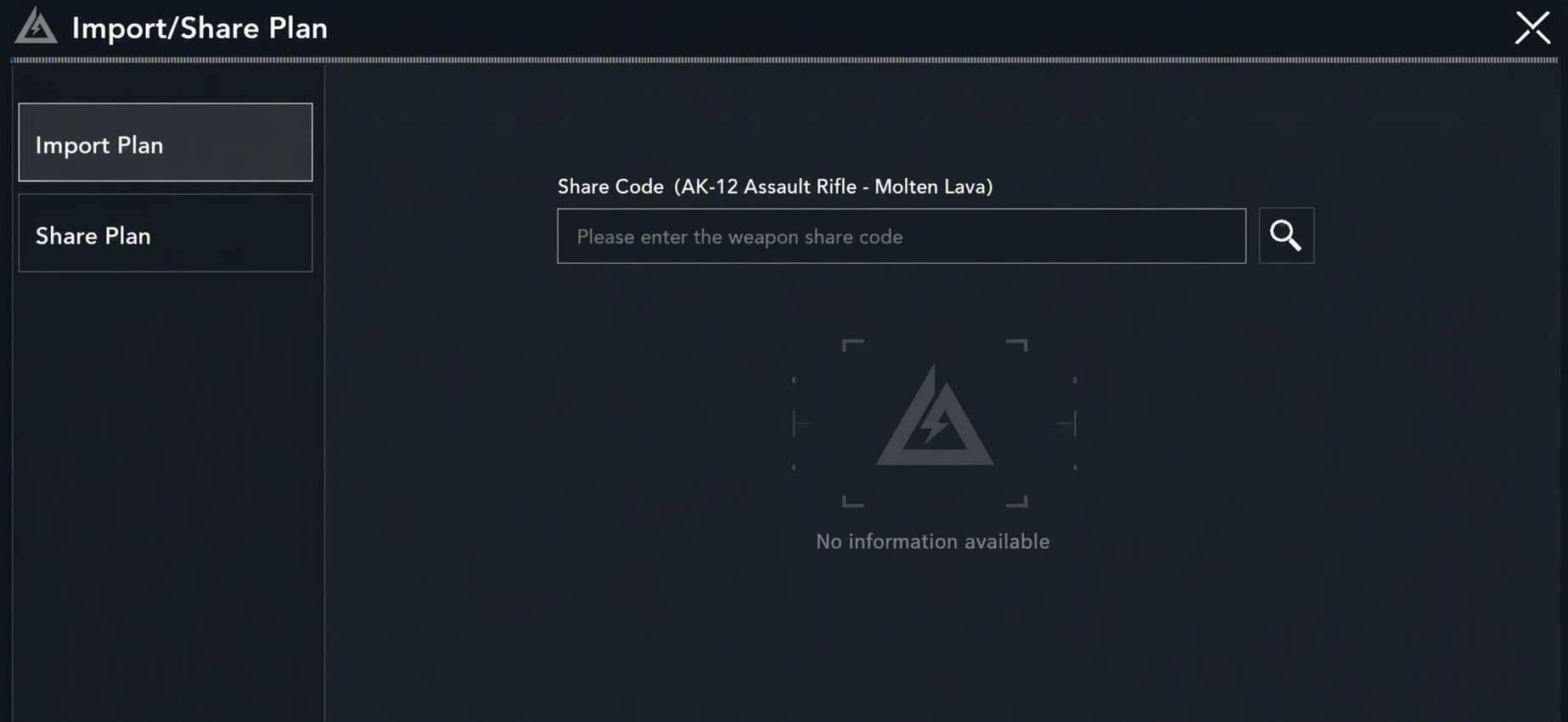
How to Import a Delta Force Gun Code
1. Open Delta Force and select the game mode that matches the Gun Code.
2. For Havoc Warfare, open Loadouts, select the appropriate class and weapon, then choose Modify.
3. For Hazard Operations, open Gunsmith, select the matching weapon, and choose Modify.
4. In the weapon modification screen, open the Loadout tab.
5. Select Import, usually located near the bottom-right of the screen.
6. Choose Import Loadout and paste the complete Gun Code into the code field.
7. Search for or confirm the imported setup.
8. Review the weapon build and select Apply Loadout.
The same core import process is used across modes, but the starting menu differs. Warfare begins from Loadouts, while Hazard Operations begins from Gunsmith.
Check the Mode Before Importing
A Gun Code should match the mode you plan to play. Delta Force Tools labels weapon Builds by mode so you can identify whether a code is intended for Havoc Warfare or Hazard Operations before copying it.
Use a Warfare Build when you are preparing a Havoc Warfare loadout. Use an Operations Build when you are preparing for Hazard Operations. If you paste a code in the wrong mode or try to import a build for a different weapon, the import may not work as expected.
For example, the MCX LT Hazard Operations build on Delta Force Tools uses an Operations Gun Code. Import it while setting up the MCX LT in Hazard Operations, not while configuring a Warfare class.
What to Do If a Gun Code Does Not Work
If a Gun Code does not import correctly, check these points before assuming the Build is broken.
Make sure you copied the full code. Missing one character, adding an extra space, or copying only part of the code can prevent the game from recognizing it.
Make sure you selected the correct game mode. Warfare and Hazard Operations use different starting menus and Builds may be mode-specific.
Make sure you opened the matching weapon. A code for one rifle should not be imported while you are modifying a different weapon.
Check whether the creator has updated the Build. Weapon balance, available attachments, Build pricing, and Gunsmith setups can change during a season.
Try copying the code again directly from the live Build page. Avoid retyping it manually whenever possible.
If you still cannot import a build, test another current code from Delta Force Tools. This can help determine whether the issue comes from the copied code, the selected weapon, the game mode, or a temporary in-game interface problem.
Recommended Delta Force Gun Codes to Try
If you want a few starting points, use the Build pages below to compare different weapons and modes.
The CI-19 is a Warfare option for players looking to test a community-used rifle Build in Havoc Warfare.
The AUG Hazard Operations Build is positioned as a long-range, sustained-fire option for players who expect longer sightlines.
The CAR-15 is a Warfare Build worth testing if you want another assault-rifle setup for class-based matches.
MCX LT Hazard Operations Build
The MCX LT Hazard Operations Build is tagged High Stability and Beginner-Friendly, making it a practical starting point for players who prefer controlled engagements.
Open each live Build page before copying because Gun Codes, build tags, prices, and community activity can change as players update their setups.
How to Choose the Right Gun Code
Do not choose a Gun Code only because it is popular. Start with the mode, your expected engagement distance, your preferred weapon type, and how much recoil control you want.
For Havoc Warfare, think about your class role, map lanes, objective pressure, and whether you need to fight aggressively at close range or provide support from farther away.
For Hazard Operations, consider extraction risk, your squad role, the value of your gear, likely engagement distance, and whether you need a more stable setup for safer controlled fights.
The best Build is the one that works for your own match conditions. Import a code, test it in a low-risk situation or the firing range when available, then decide whether it fits your aim, movement, and squad role.
Share Your Own Delta Force Loadout
You can also share a weapon setup after creating or adjusting it in Gunsmith. Open the weapon’s Loadout screen, select Import, then use Share Loadout to copy the code for your own build.
Share your code with teammates, post it in the Delta Force Tools community, or use it to compare different attachment choices. Saving a few different weapon setups can make it easier to prepare for changing map conditions and playstyles.
Find More Delta Force Builds
Browse Delta Force Tools to find current weapon Builds, compare Gun Codes, filter by mode, and discover community loadouts. Every Build page is designed to help you quickly decide whether a setup fits your next Havoc Warfare match or Hazard Operations run.
Need help choosing between several rifles? Start with our Best Weapons and Builds in Delta Force Season 10 guide, then open the individual Build pages to copy the current Gun Code.
Join the Delta Force Tools Community
Join the Delta Force Tools Discord community to discuss weapon Builds, share Gun Codes, compare loadouts, request guides, and stay updated on new tools and seasonal changes.
Add Delta Force Tools Bot to Your Server
Run a Delta Force clan, squad, or gaming community? Add the Delta Force Tools Bot to your Discord server so members can search weapon Builds, find Gun Codes, and discover community loadouts without leaving Discord.
Keep Your Builds Current
Season status: Current for Delta Force Season 10.
Last reviewed: August 28, 2026.
Gun Codes, attachment availability, weapon balance, Build tags, and player preferences can change during a season. Always check the live Delta Force Tools Build page before copying a code into an important match.